
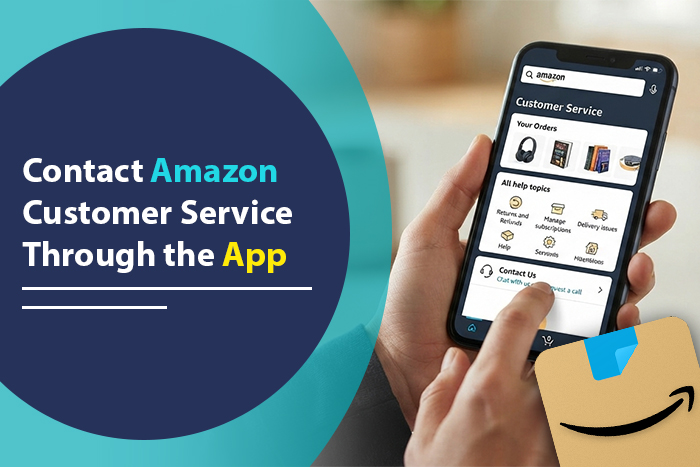
To contact Amazon customer service through the app, open the Amazon Shopping app, tap the menu icon (three lines), scroll down, and tap Customer Service. From there, pick your order or issue and choose chat or request a call. The whole thing takes under a minute once you know where to tap.
The tricky part is what happens next. Amazon now puts an automated assistant in front of its human agents, and the exact buttons can look different depending on your phone, app version, and account. This guide covers the basic steps, plus how to get past the bot, what to do when no contact option appears, and how to avoid the fake “Amazon” numbers that show up in search results.
Quick Overview
- Open the Amazon Shopping app and sign in to the account tied to your order.
- Tap the menu (three lines) in the bottom bar.
- Scroll down and tap Customer Service. You can also type “customer service” into the app’s search bar.
- Select the order or topic you need help with.
- When the assistant replies, choose Something else or I need more help to reach a person.
- Pick Chat with an associate for text support or Request a call (sometimes labeled “Talk to us” or “Call me”) to get a callback.
Amazon support is available around the clock for most U.S. shoppers. If you would rather dial in, the number Amazon publishes on its own Help and Contact Us page is 1-888-280-4331.
How Do You Find Customer Service in the Amazon App?
Customer Service lives inside the app’s main menu. You do not need a separate support app.
On iPhone and Android
- Open the Amazon Shopping app.
- Tap the three horizontal lines in the bottom navigation bar. On most current versions it sits at the bottom right.
- Scroll past the shopping categories and programs.
- Tap Customer Service.
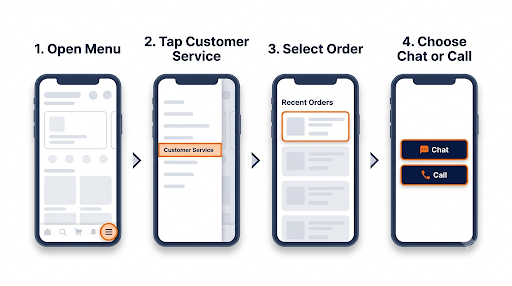
The layout is nearly the same on both platforms. Small differences in icon placement come from app updates, not from your device type. If you cannot see the menu icon at all, update the app from the App Store or Google Play first.
The faster shortcut: search for it
Amazon itself suggests typing “customer service” into the search bar. This often drops you straight onto the Customer Service home page, which helps if the menu has been rearranged after an update.
Amazon India and other countries
If you use the Amazon India app or another regional store, the path is similar: menu, then Customer Service, then pick an order and choose chat or a callback. Phone numbers, hours, and labels vary by country, so always use the contact options shown inside your own regional app rather than a number from a U.S. article.
How Do You Chat With Amazon Customer Service in the App?
You chat with Amazon by opening Customer Service, choosing a topic, and asking the automated assistant to connect you to an associate. Chat is usually the quickest route for simple order problems because you can stay in the app while you wait.
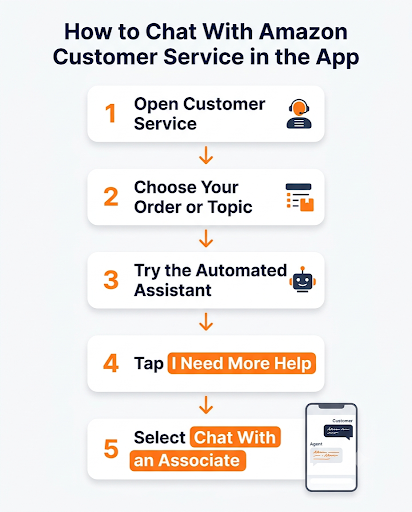
- Go to Menu > Customer Service.
- Pick the order with the problem, or tap a general topic if your issue is about your account.
- The Amazon messaging assistant will open and offer quick fixes.
- If the quick fixes do not solve it, tap I need more help or Something else.
- Select Chat with an associate now when it appears.
- Stay on the screen. You will see a notice when a human joins.
Tip: The assistant is not useless. For a simple refund on an eligible item, a late package, or a return label, it can sometimes fix things instantly without any wait. Give it one try, then ask for a person if it loops.
How Do You Request a Call From Amazon Through the App?
Amazon does not usually show a phone number to tap. Instead, you ask Amazon to call you.
- Open Customer Service and choose your issue.
- Work through the assistant until you see contact choices.
- Tap the call option. Depending on your version, it may say Request a call, Talk to us, or Call me.
- Confirm or enter your phone number.
- Tap Call me now.
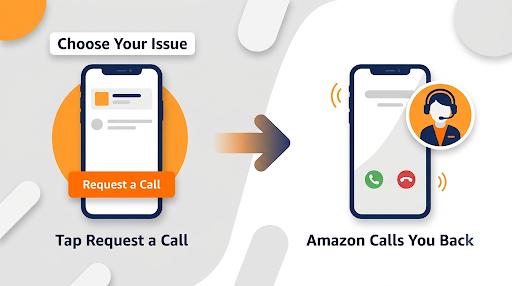
Amazon’s system then calls you, usually within a few minutes. An automated voice may greet you before a person picks up. The big advantage of a callback over dialing in yourself is that Amazon already knows which account and topic you are calling about, so you skip some of the verification.
Use the phone number on your Amazon account if you can. It makes verification faster, whether you request a callback or call 1-888-280-4331 directly.
Which Contact Method Should You Use?
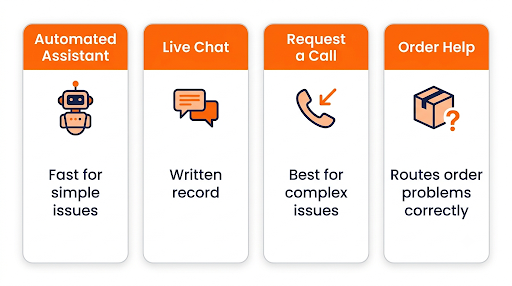
Pick the method based on how complicated your problem is and whether you need a record of the conversation.
| Method in the app | Best for | Main advantage | Downside |
| Automated assistant | Simple refunds, return labels, tracking questions | Can resolve things instantly | Struggles with unusual cases |
| Chat with an associate | Missing items, damaged products, billing questions | You get a written record | Transfers between departments can happen |
| Request a call | Account lockouts, complex disputes, multiple orders | Easier to explain tricky situations | No written transcript |
| Order-specific help (Your Orders) | Anything tied to one order | Routes you to the right team faster | Not useful for account-wide issues |
What Is the Fastest Way to Get Help With a Specific Order?
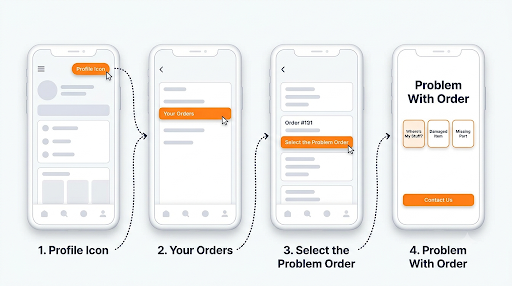
Start from the order itself, not from the general Customer Service page. This sends your request to the right team with the order details already attached.
- Tap the profile icon in the bottom bar and open Your Orders.
- Tap the order with the problem.
- Choose Problem with order or Get help with order.
- Pick what went wrong, such as “Where’s my stuff?”, damaged item, or missing part.
- Follow the options, then choose Contact us if you still need a person.
Common order problems and where to start
- Package marked delivered but missing: Open the order and select the missing package option. Amazon usually asks you to check around your home and with neighbors first, and may ask you to wait a short time before it offers a refund or replacement.
- Late delivery: Check the tracking page first. If the estimated date has passed, the order page will usually show a contact or refund option.
- Damaged or wrong item: Start a return from the order. For most items sold by Amazon, this is faster than chatting.
- Refund not showing up: Check the return status in Your Orders. Refunds can take several business days to reach your bank or card even after Amazon issues them.
Who Should You Contact If a Third-Party Seller Sold the Item?
If the product page or order says “Sold by” a company other than Amazon, contact the seller first. Amazon’s own help page on contacting third-party sellers lays out this path:
- Go to Your Orders.
- Tap the third-party item.
- Choose Problem with order, then Contact seller.
- Write a clear message with what went wrong and what you want (refund, replacement, missing part).
Seller replies land in your Amazon messages, and you will normally get an email alert too. If the seller ignores you or refuses a fair fix, contact Amazon customer service and ask about the A-to-z Guarantee, which covers eligible orders from third-party sellers.
Common mistake: Many people message Amazon support about a seller problem first, get told to contact the seller, and lose a day. Check the “Sold by” line before you open a chat.
How Do You Get Help With Prime, Subscriptions, or Your Account?
Prime and account problems go through the same Customer Service page. Choose the topic about your membership, account, or payments instead of an order.
- Prime charge you did not expect: Check Your Account > Prime membership first. You can often end the membership or check refund eligibility there without talking to anyone.
- Subscribe and Save, Kindle Unlimited, Audible, or channel subscriptions: Most of these can be managed from your account settings. Our step-by-step guide on how to cancel an Amazon subscription walks through each one, so you may not need support at all.
- Locked out of your account: If you cannot sign in, you cannot use in-app chat. Use the “Forgot password” flow on the sign-in screen, or call Amazon from a phone number linked to the account.
- Payment declined or billing errors: Choose the payments topic in Customer Service. Have the last four digits of the card and the charge date ready.
The Prime support line is the same as the main U.S. customer service number. There is no separate “Prime only” phone line for regular members.
What Should You Do If the Chat or Call Option Is Missing?
If you only see help articles and no chat or call button, you are not alone. In early 2026, some shoppers on Reddit reported that contact options had disappeared from their Help page, and later noticed it seemed to affect only some accounts. Amazon tests different layouts, so what you see may differ from a friend’s phone.
Try these fixes in order:
- Choose “Something else” at every step. Several users found that picking this option repeatedly, instead of answering the bot’s narrow questions, eventually surfaced the chat and call choices.
- Type your request plainly. In the chat box, type something like “I need to speak with an associate.” The assistant often responds by offering chat or phone options.
- Start from a specific order. Order-based help paths tend to show contact options more reliably than the general page.
- Update or reinstall the app. An outdated version can hide newer menu items.
- Try the mobile browser. Open amazon.com in Safari or Chrome on your phone, sign in, and go to Help and Contact Us.
- Call directly. Dial 1-888-280-4331 from the phone number on your account if nothing in the app works.
How Do You Avoid Fake Amazon Customer Service Numbers?
Only trust contact options shown inside the Amazon app or on amazon.com. This matters more than most guides admit. Searching “Amazon customer service number” often turns up random numbers posted in forums, Q&A sections, and spam pages. Some of those lead to scammers who answer the phone as “Amazon.”
The FTC has reported that about one in three people who reported a business impersonator over a one-year period said the scammer claimed to be from Amazon. Amazon’s own advice is to use only its app or website for customer service, account changes, delivery tracking, and refunds.
Red flags that you are not talking to the real Amazon:
- They ask you to pay with gift cards or send photos of gift card codes.
- They want you to install an app or give them remote access to your phone or computer.
- They called or texted you first about an order you do not recognize, with a number to call back.
- They create urgency, like “your account will be closed in one hour.”
- They ask for your full password or one-time verification code.
If something feels off, hang up, open the Amazon app yourself, and check Your Orders. You can also report suspicious messages to Amazon and to the FTC at ReportFraud.ftc.gov.
What Should You Have Ready Before Contacting Amazon?
A little prep can cut your chat time in half and reduce transfers.
- Order number, found in Your Orders.
- A one-sentence summary of the problem, such as “Package marked delivered on Monday but not received.”
- What you want: refund, replacement, or a fix.
- Photos if an item arrived damaged or wrong.
- Dates of delivery, return drop-off, or the charge in question.
- Tracking number for returns you have already shipped.
Paste your summary as the first message in chat. If you get transferred, paste it again. It saves you from retyping the whole story.
How Do You Keep a Record of Your Chat With Amazon?
Save proof of what the agent promised, especially for refunds and credits. A few ways to do that:
- Take screenshots during the chat, especially when the agent confirms a refund amount or date.
- Check your email. Amazon usually sends a follow-up email after a chat. You can reply to it if the issue comes back.
- Look in Your Messages. In the app, go to the profile icon, then Your Account, then Your Messages to see communications from Amazon and sellers.
- Write down the agent’s name and the time if you are on a call.
If you come back to the Customer Service page shortly after a chat, you may see an option to return to your open chat. This lets you continue with the same context instead of starting over.
Is There Special Support for Devices, Business Accounts, or Accessibility?
Yes. Some issues go to dedicated teams, and picking the right one saves a transfer.
- Kindle, Echo, Fire TV, Alexa, Prime Video, and Amazon Music: Choose the devices or digital services topic in Customer Service. Amazon runs a separate Digital Services and Device Support team for these.
- Amazon Business accounts: Business customers have their own support team, which Amazon says is available 24 hours a day. Expect to verify your identity for security.
- Accessibility needs: Amazon has a dedicated Accessibility Support Team for customers who need help with the app, orders, or devices. You can find it by searching “accessibility” in the app’s Customer Service section.
Frequently Asked Questions
Is Amazon customer service in the app available 24/7?
Yes, for most U.S. customers chat and callbacks are available around the clock. Wait times are usually longer during big shopping events like Prime Day and the holiday season, so the automated assistant or order-page fixes can be faster at those times.
Can I email Amazon customer service from the app?
Amazon has moved away from a simple public email address for most customer issues. Chat and callback are the main options in the app. You can reply to the follow-up email Amazon sends after a chat if the same issue continues.
Why does Amazon keep transferring me to different departments?
Transfers usually happen when an issue touches more than one team, like a refund on a third-party order or a device tied to a subscription. Start from the specific order or pick the most precise topic to reduce this. If you get bounced more than twice, ask the agent to note the case and stay with you until the right team joins.
Can I contact Amazon customer service without signing in?
In-app chat and callbacks need you to be signed in, because Amazon has to verify the account. If you are locked out, use the password reset option or call the number listed on Amazon’s Help page from a phone number linked to your account.
Can I ask for a supervisor in Amazon chat?
Yes, you can politely ask the associate to escalate your case to a supervisor or a specialist team. It helps to explain what has already been tried and what result you are asking for. Keep your request calm and specific.
Does the Amazon app work for customer service if I bought something on the website?
Yes. Orders are tied to your account, not to the device you used. Anything you bought on the website shows up in Your Orders in the app, and you can get help with it there.
Final Recommendation
For most problems, start inside the order: Your Orders, tap the item, then Problem with order. If it is not tied to an order, go to Menu > Customer Service, choose your topic, and tap “I need more help” until you can chat with an associate or request a call. Pick chat when you want a written record and a callback when the issue is hard to explain in text.
If the contact buttons are missing, keep choosing “Something else,” type that you want to speak with an associate, or call 1-888-280-4331 from your account’s phone number. And whatever you do, never call an “Amazon” number you found in a random search result, text, or email. Your app is the safest front door to Amazon support.